The AI coding tools finally noticed accessibility. Now what?
For most of the last two years, accessibility was the thing AI coding assistants forgot about. You could write "follow WCAG AA" in your instructions file and watch the model add alt="" to decorative icons, lose track of focus on the next refactor, and produce a <div onclick> two prompts later. The lane between "AI writes code" and "code is accessible" was empty, and we have spent the better part of a year arguing that something needed to live there.
In May 2026, two things landed in that lane on the same week.
github/accessibility-scanner is a GitHub Action, shipped by GitHub itself, that runs axe-core against your site, files a GitHub Issue for every finding, and (optionally) hands those issues to Copilot to propose fix PRs. It is in public preview, MIT licensed, currently at v3.2.0, and it lives in the official github org. This is not a side project from a researcher; this is GitHub planting a flag.
Community-Access/accessibility-agents is a community pack of accessibility-focused agents, skills, and prompts that runs across Claude Code, GitHub Copilot, Gemini CLI, Codex CLI, and an HTTP MCP server. The README claims 79 agents across 8 teams targeting WCAG 2.2 AA, with 100% source citation coverage. Five 5.x releases shipped in May alone. It is led by Taylor Arndt and Jeff Bishop under the Community-Access org, with 275 stars and the kind of release cadence that signals it has a real maintainer behind it.
Two months ago, neither of these existed.
What just changed
For years, the accessibility-tooling conversation was dominated by a handful of established names: Deque's axe family, Siteimprove, Level Access, BrowserStack. They built excellent scanners that ran in CI, in browsers, in audit suites — but mostly next to the developer's workflow, not inside it.
What changed in 2026 is that the AI coding assistant became the primary developer interface for a meaningful slice of teams, and accessibility tooling started showing up inside that interface instead of beside it.
github/accessibility-scanner is the cleanest expression of this shift. The pattern is: scanner finds an issue, scanner files a GitHub Issue with a structured description, scanner hands that issue to Copilot, Copilot proposes a PR, a human reviews. The README is explicit: "cannot guarantee fully accessible code suggestions. Always review before merging." That disclaimer is the entire architecture: an automated detection layer feeding an AI remediation layer feeding a human review layer.
Community-Access takes a different shape — install agents into your CLI, let them ride along with every prompt you write — but the underlying premise is the same. Accessibility belongs inside the AI loop, not in a separate browser tab you forget to open.
We have been arguing for this in pieces — in Accessibility belongs where developers already work, in The accessibility tree is the new API, in Accessibility MCP servers for AI coding agents. The premise is no longer contested. The question is what each tool does well, and what it leaves to the layer above.
What scanners are good at
Both of these tools share an honest, narrow strength: they catch the things axe-core catches, fast, and they put those findings somewhere a developer is already looking.
axe-core is excellent at a well-defined set of failures. Missing form labels. Insufficient colour contrast on text it can measure. ARIA used in invalid combinations. Heading order anomalies. Images without alt text. Documents without a <title>. The industry tells a story that automated scanning catches "30–40% of WCAG issues," and that number is approximately right for the criteria that have a clean computational definition.
That 30–40% is real value. A team that runs nothing today and starts running github/accessibility-scanner on every PR will catch real bugs that would otherwise ship. Community-Access takes the same engine and threads it through the AI prompt loop, which means the fix proposals arrive in the developer's IDE instead of as a Jira ticket someone else has to triage.
Both tools deserve credit for being honest about scope. The github/accessibility-scanner README states what it does not cover: PDFs, mobile apps, desktop apps, Office documents, email templates. The Community-Access README front-loads a disclaimer that "AI and automated tools are not perfect" and recommends verifying with VoiceOver, NVDA, JAWS, and keyboard navigation. Neither tool oversells itself, which is rarer in this category than it should be.
What scanners cannot do, and have never been able to do
The 60–70% of WCAG that automated scanning misses is not random. It is the part of WCAG that requires judgement about meaning, and judgement about meaning is exactly what AI coding tools, even very good ones, are not yet reliable at.
A few concrete examples of what no scanner — axe, Lighthouse, IBM Equal Access, Pa11y, the lot — can verify on its own:
Is this alt text correct? <img alt=""> passes the "image has alt" check. So does <img alt="image">. So does <img alt="A man and a woman"> on a photo of a wedding ceremony where the relevant detail is that they are exchanging rings. The scanner sees that the attribute exists. It cannot see whether the words inside describe what matters.
Is this heading hierarchy meaningful? A scanner can verify that an <h3> does not appear before an <h2>. It cannot verify that the page's actual structure reflects its content — that the "Pricing" section is at the same level as "Features" rather than nested under it.
Is this focus order logical? A scanner can check that every interactive element is keyboard-reachable. It cannot check that the order in which you reach them matches the order in which a sighted user would visually scan the page. WCAG 2.4.3 (Focus Order) is fundamentally a judgement call about whether the experienced sequence makes sense.
Does this error message help? WCAG 3.3.3 (Error Suggestion) requires that when a user makes an input error, the system suggests a correction if possible and if it would not jeopardise security. "Invalid input" technically appears. Whether it tells the user what to do next is a different question.
Does this content describe its own non-text characteristics? WCAG 1.3.3 (Sensory Characteristics) requires that instructions not rely solely on shape, colour, position, or sound. "Click the green button on the right" fails. A scanner cannot detect this because the sentence is grammatically and structurally fine.
Is this consistent across pages? WCAG 3.2.4 (Consistent Identification) requires that components with the same functionality be identified the same way across a site. A scanner sees one page at a time. The criterion only exists across pages.
This is not a criticism of github/accessibility-scanner or Community-Access specifically. It is a feature of automated scanning as a category. The criteria above were written to be human-judged, and adding AI to the loop helps but does not close the gap on its own — because the AI making the judgement has no record of what it judged last week, no way to prove the judgement to an auditor, and no enforcement when next week's refactor undoes today's fix.
The evidence problem the scanners do not solve
Suppose you ship github/accessibility-scanner on Monday. By Friday, your repo has fifty open issues filed by the scanner. Copilot has proposed PRs for twenty of them. Your team has merged twelve. The other thirty-eight sit in the backlog. What can you say about your WCAG conformance?
You can say: "We ran an automated scanner against our site, it found fifty issues, and we fixed twelve of them." That is not a compliance statement. It is a status update.
WCAG conformance under the European Accessibility Act, under DOJ Title II in the US, under the UK Equality Act, requires more than "we ran a scanner." It requires evidence that all applicable success criteria were evaluated, that failures were tracked, that fixes were verified against the specific criterion they were supposed to satisfy, and that the evaluation method itself was sound. The shape of the evidence is well-defined; it has been defined for years in the WCAG-EM methodology and in the EN 301 549 standard the EAA references.
Neither github/accessibility-scanner nor Community-Access produces this. They are not designed to. github/accessibility-scanner produces a stream of GitHub Issues. Community-Access produces an AI agent that helps you write more accessible code. Both are useful inputs. Neither is the artefact.
This is the gap we have been talking about for a year. The scanner says "here is what I found." The conformance authority asks "what about everything you did not find? How do you know it was evaluated?" The honest answer for any automated-only workflow is: it was not.
Where each layer fits
The picture that is emerging, and that I think will harden over the next twelve months, looks like this:
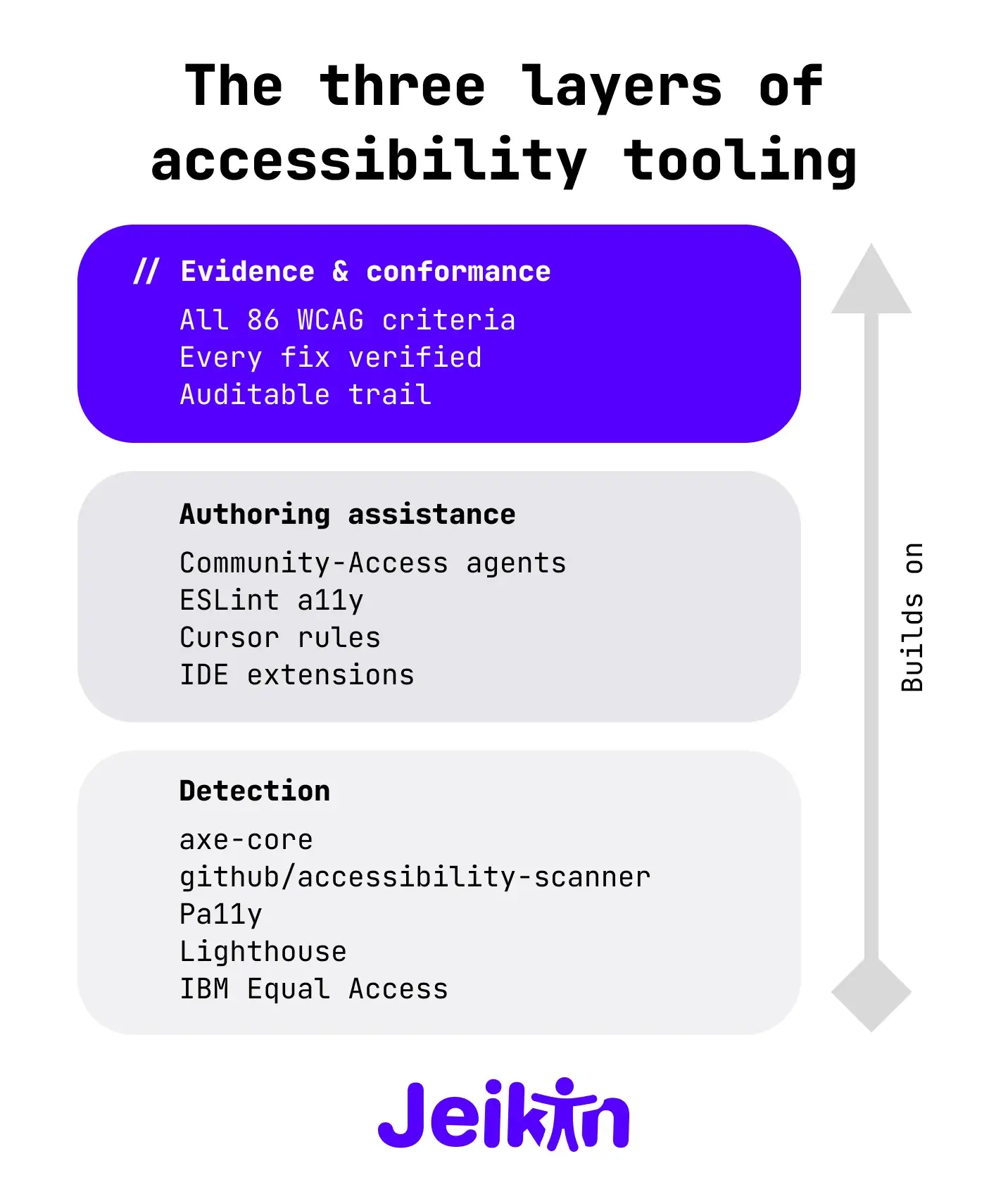
Layer 1 — Detection. axe-core and the tools built on it (github/accessibility-scanner, axe DevTools, Pa11y, Lighthouse) find the 30–40% of issues that can be detected mechanically. They run fast, they run in CI, they catch regressions. Every team should have one of these running. github/accessibility-scanner is a particularly strong choice if you are already on GitHub Actions and using Copilot, because the friction is approximately zero.
Layer 2 — Authoring assistance. Community-Access, ESLint a11y plugins, IDE extensions, and Cursor rules help developers write accessible code as they type it. This is genuinely valuable because the cheapest accessibility bug is the one you never introduce. Community-Access is the most ambitious thing in this layer right now, and the cadence suggests it will keep growing.
Layer 3 — Evidence and conformance. This is where the WCAG criteria that resist automation get evaluated, where fix verification happens, where the conformance report comes from. This layer needs AI assistance (because there are 86 criteria and a typical site has hundreds of components), and it needs structured tracking (because the auditor needs to see the trail), and it needs human judgement (because some of these criteria fundamentally require it).
This is where Jeikin lives. Not in competition with github/accessibility-scanner — we run axe-core internally too, and we celebrate when GitHub makes the detection layer free and ubiquitous. Not in competition with Community-Access — we are happy when more agents understand WCAG, because every team that ships better code is one less remediation project for everyone.
We live in Layer 3 because Layer 3 is what the EAA inspector asks for, what the DOJ Title II deadline requires, what the procurement questionnaire wants attached. The scanner catches the things scanners catch. The agent helps with the things agents help with. Jeikin tracks the 86 criteria, verifies each fix against the specific criterion it claimed to satisfy, and produces the evidence trail that turns "we use accessibility tools" into "here is our conformance position, with citations."
The good problem
The honest read on May 2026 is that the AI coding tools category has finally noticed the thing accessibility advocates have been pointing at for a decade. GitHub shipped a scanner. Anthropic, OpenAI, and Google all support the MCP standard that lets accessibility servers plug into agent workflows. A community pack of 79 agents exists. BrowserStack and Siteimprove are racing to ship their own MCP servers. The lane is no longer empty.
This is a good problem to have. It means the conversation has moved from "does this matter?" to "which layer should this live in, and how do they hand off?" The teams that were going to ship inaccessible products anyway will keep doing so, but they will now have to actively turn off tools that are free, default, and inside their workflow. That is a meaningful shift.
The remaining work — Layer 3 work — is harder than detection, because it is not just "run a scanner." It is the boring discipline of evaluating every applicable criterion, tracking what passed and what failed, verifying every fix against the criterion it claimed to address, and keeping the evidence current as the codebase moves. We built Jeikin because nobody else was building that layer, and because without it the rest of the stack is detection without accountability.
If you adopt github/accessibility-scanner this week, do it. If you install Community-Access into your CLI, do it. They are good tools, they raise the floor, and they make the rest of our job easier. Then, when the auditor or the procurement form or the DOJ deadline asks what you actually did about WCAG, come talk to us about the layer the scanners do not cover.
The scanner says "here is what I found." The agent says "here is what I would write." Conformance asks "where is the proof you evaluated everything you should have?" The answer to that question lives in a different layer, and that layer is what we are building.