GitHub Integration
Now on GitHub MarketplaceAccessibility reviews on every pull request
The Jeikin bot checks every PR for WCAG violations before your team merges. Issues show up where developers already work: inline in the code diff, with severity levels and one-click fix links.
What the bot does
When someone opens a pull request or pushes new commits, the Jeikin bot:
Scans changed UI files
Components, pages, and layouts in React, Next.js, Vue, Svelte, and plain HTML. Non-UI files (tests, configs, utilities) are skipped automatically.
Posts inline annotations
Each issue appears directly on the line that caused it in the Files Changed tab. No context switching.
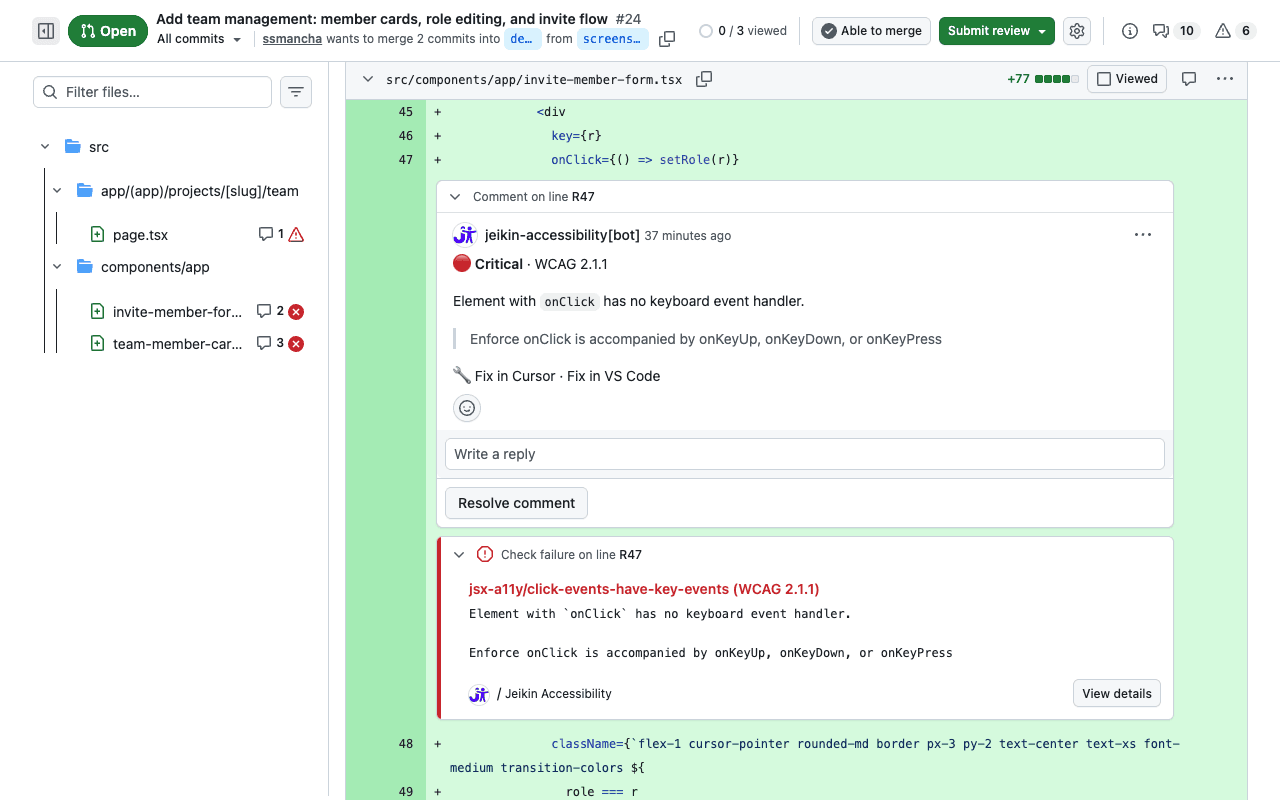
Inline annotations appear on the exact lines that need attention.
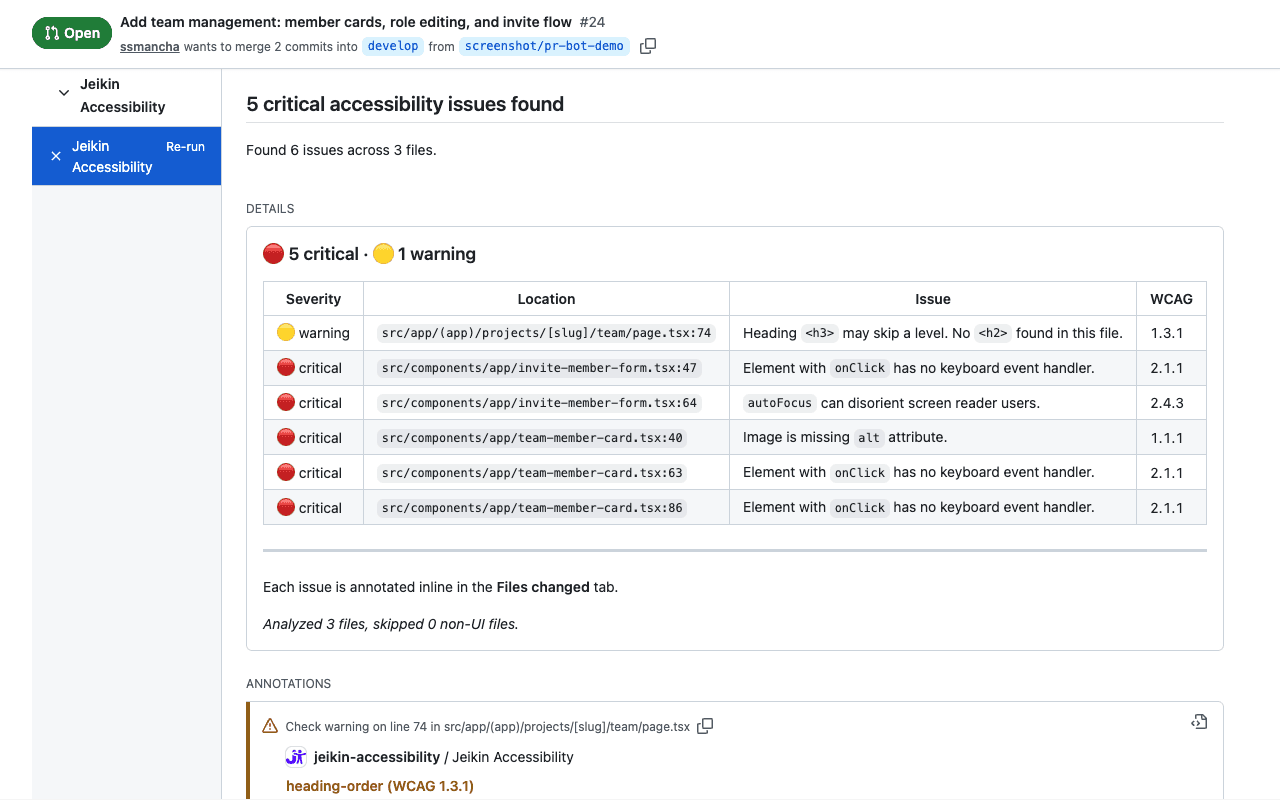
Creates a check run
A summary with severity breakdown and a table of all violations. Click Details to see everything at a glance.
Adds review comments
Each comment includes the WCAG criterion, a plain-language explanation, and one-click links to fix it in Cursor or VS Code.
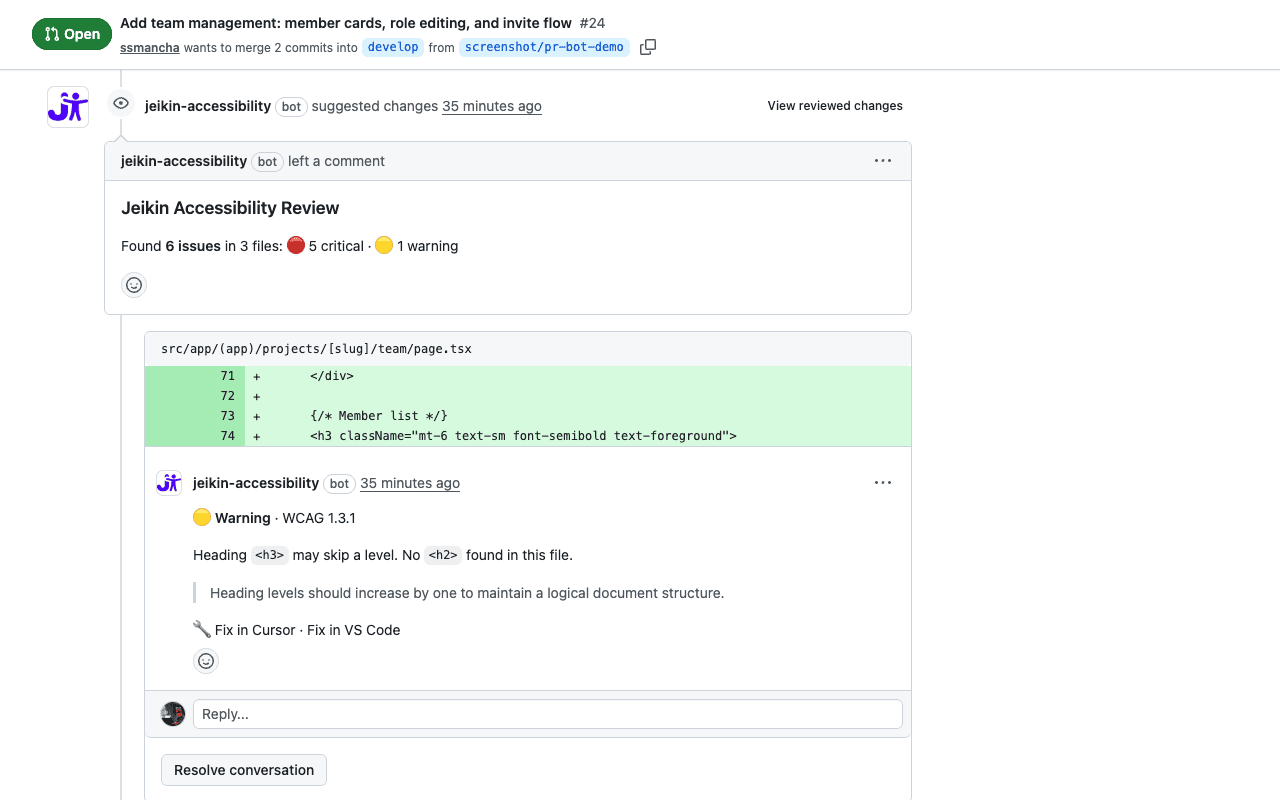
The bot posts a summary with severity breakdown and detailed review comments.
What it checks
Missing alt text
Images, areas, and input[type=image] without descriptive alt attributes.
WCAG 1.1.1
Keyboard inaccessibility
onClick handlers without matching keyboard events. Interactive elements that only work with a mouse.
WCAG 2.1.1
Heading hierarchy
Skipped heading levels that break document structure and confuse screen reader navigation.
WCAG 1.3.1
Focus management
Focus stolen on page load, or positive tab indexes that break natural tab order.
WCAG 2.4.3
Invalid links
Anchor elements missing href attributes. Links that don't go anywhere.
WCAG 2.4.4
More rules coming
The bot's rule set grows with every release. Universal rules apply to all projects automatically.
Set up in 2 minutes
Install the GitHub App
Go to github.com/apps/jeikin-accessibility (opens in new tab) and select the repositories you want to protect.
Open a pull request
The bot triggers automatically on every PR that changes UI files. Draft PRs are skipped.
Fix what the bot finds
Click “Fix in Cursor” or “Fix in VS Code” to jump straight to the issue. Or resolve it manually — the bot re-checks on every push.
Track everything on your dashboard
The bot works standalone, but when you create a Jeikin project and connect your repository, bot activity appears on your project dashboard:PRs reviewed, issues found, pass rate over time.
Combined with the MCP integration, you get a complete picture: the bot catches issues in PRs, the AI fixes them in your editor, and the dashboard tracks the evidence.
Common questions
Does the bot see my source code?
The bot reads file contents only for the files changed in the PR, using a short-lived installation token scoped to that repository. It analyses the code for accessibility patterns and discards the content immediately. No code is stored, logged, or sent to third parties. See our Privacy Policy for details.
Does it work with monorepos?
Yes. The bot filters changed files by extension (.tsx, .jsx, .vue, .svelte, .html) and skips everything else. It doesn't matter how your repo is structured.
Can it block merges?
The bot creates a GitHub Check Run. You can configure branch protection rules to require the “Jeikin Accessibility” check to pass before merging. This is optional and configured in your GitHub repository settings, not in Jeikin.
What permissions does it need?
Checks: write (to post check runs with annotations), Pull requests: write (to post review comments), Contents: read (to read changed files). No admin access, no write access to your code.
Is it free?
Free for individuals and small teams. Up to 3 projects per account.
Start catching accessibility issues in your PRs
Install in 30 seconds. No configuration needed. The bot starts reviewing on the next pull request.